VS Code Configuration Tutorial
Connect with OpenAI Compatible to the LLM API Gateway in VS Code + Cline.
Goal: Install Cline in VS Code and connect to the LLM API Gateway using the OpenAI Compatible method. After setup, you can make AI read code, edit code, write commands, and explain errors directly in VS Code.
| Setting | Value | Notes |
|---|---|---|
| API Provider | OpenAI Compatible | Cline officially supports OpenAI-compatible providers. |
| Base URL | https://api.llm-token.cn/v1 | Do not enter the full /chat/completions path. |
| API Key | sk-xxxxxxxx | Paste your complete Key. |
| Model ID | Copy the complete model name from the model list | Most Model Not Found errors come from a wrong value here. |
1. Prerequisites
- Install VS Code: https://code.visualstudio.com/
- Install Git: https://git-scm.com/downloads
- Windows users should restart the computer after installing Git so the environment variables take effect.
2. Install the Cline Extension
- Open VS Code and click Extensions in the left sidebar to open the marketplace.
- Search for Cline and click Install.
- After installation, the Cline icon appears on the left side.
- If the icon does not appear, restart VS Code.
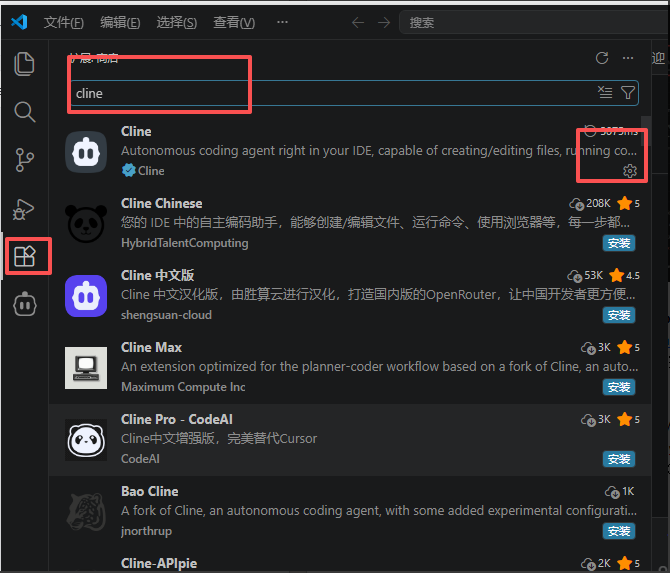 The interface for searching the Cline plugin in VS Code. Several icons a…
3. Open Cline Settings
Click the Cline icon on the left side, enter the Cline panel, then open Settings.
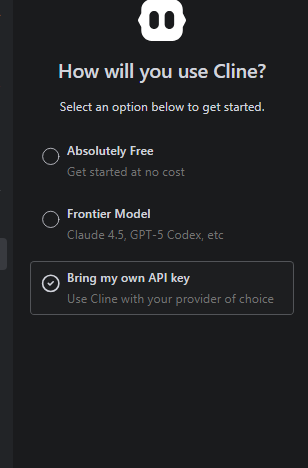 A screenshot of the Cline setup step in VS Code, matching the step of op…
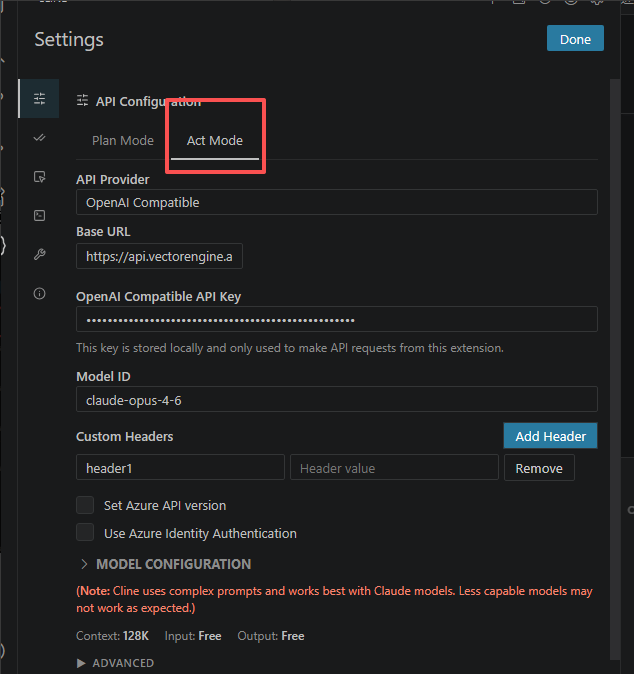 An image showing the settings screen of the Cline plugin in VS Code. On…
The image above is only for locating the fields in Cline. The third-party http://... address and model name in the image are not the LLM API Gateway configuration, so do not copy them; use the HTTPS Base URL from the table in this article and the model list on this site.
4. Enter the LLM API Gateway Details
- API Provider: Select OpenAI Compatible.
- Base URL: Enter
https://api.llm-token.cn/v1. - API Key: Paste your Key beginning with
sk-. - Model ID: Enter the complete model ID, for example
claude-sonnet-4-6. - Save the configuration, then start a new task to test it.
If saving reports an error: First confirm that Base URL is not written as https://api.llm-token.cn/v1/chat/completions. Cline expects the API root path, which is /v1.
5. Testing and Troubleshooting
| Symptom | Resolution |
|---|---|
| Cannot enter URL | Confirm that OpenAI Compatible is selected, not the regular OpenAI official provider. |
| Model Not Found | The model ID must exactly match the model list. |
| Connection failed | Check the Key, Base URL, and network proxy; on a corporate or campus network, try a hotspot instead. |
| No Cline icon | Restart VS Code; if it is still missing, reinstall the extension. |
OpenCode Setup: API Key, Base URL and Model Config
Set up OpenCode in the terminal or desktop app: install it, enter your API key and Base URL, configure a model ID, and check common connection errors.
Chatbox Setup Guide (ChatGPT Provider / Desktop)
Quickly connect Chatbox for desktop chat, translation, writing, and Q&A.