Trae Setup Guide
Install the Cline extension in Trae and connect it to the LLM API Gateway.
Goal: Install the Cline extension in Trae, then connect a model through the LLM API Gateway's OpenAI-compatible endpoint. The setup is nearly identical to VS Code.
| Setting | Value | Notes |
|---|---|---|
| API Provider | OpenAI Compatible | Choose a provider that accepts a custom Base URL. |
| Base URL | https://api.llm-token.cn/v1 | Do not enter a full API endpoint. |
| API Key | sk-xxxxxxxx | Copy the complete Key. |
| Model ID | Complete model ID from the model list | Start with a fast model for your first test. |
1. Prerequisites
- Install Trae: https://trae.cn/
- Install Git: https://git-scm.com/downloads
- Windows users should restart the computer after installing Git.
2. Install the Cline Extension
- Open Trae and select Extensions in the left sidebar.
- Search for Cline and install it.
- Restart Trae after installation to ensure the extension loads.
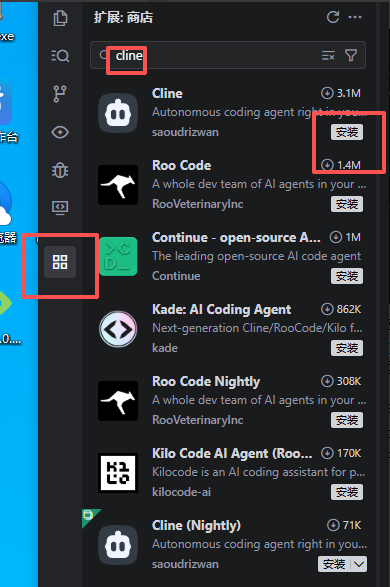 Trae extension marketplace with cline entered in the search field and ma…
If the extension is missing: Trae supports extension management. If the extension is unavailable in its store, follow the Trae extension documentation to download a VSIX from the VS Code Marketplace and install it manually.
3. Open Cline Settings
Select the Cline icon in the left sidebar to open its settings.
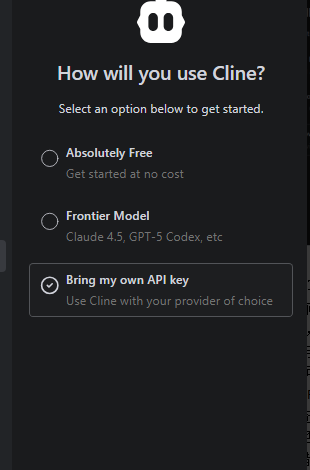 Cline onboarding screen asking how to use Cline, with Absolutely Free, F…
4. Configure the API
- API Provider: Select OpenAI Compatible.
- Base URL: Enter
https://api.llm-token.cn/v1. - API Key: Paste your complete Key.
- Model ID: Enter the complete model ID.
- Click Done / Save to save the configuration.
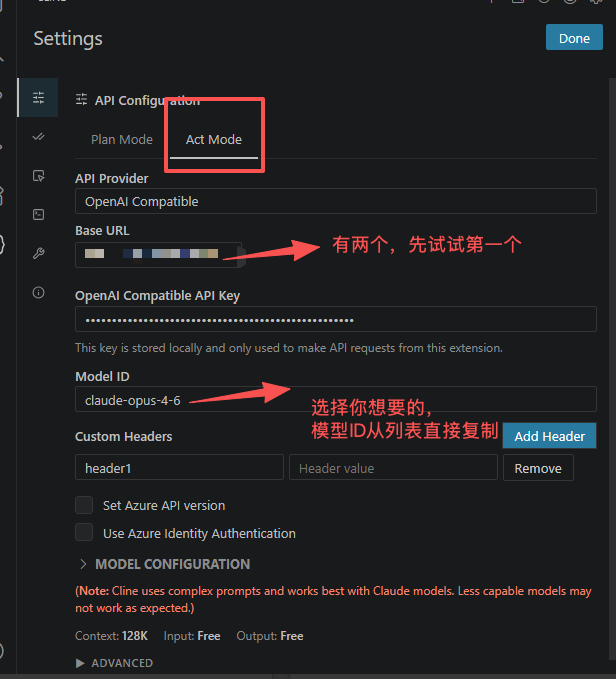 Trae Cline API Configuration screen with Act Mode selected, OpenAI Compa…
5. Verification and Troubleshooting
| Symptom | Resolution |
|---|---|
| Configuration succeeds | You can select the model and start a chat or coding request. |
| Cannot enter a URL | Confirm that Cline is installed and API Provider is set to OpenAI Compatible. |
| Connection fails | Check the Base URL, API Key, network proxy, and model ID. |
| Model unavailable | Copy the complete model name from the model list and paste it again. |