Tencent Cloud / OpenClaw Custom Model Configuration
Use a directly verifiable JSON5 example to explain how to fill in the fields for the interfaces compatible with OpenAI and Anthropic.
First prepare three items: your LLM API Gateway API Key, the https://api.llm-token.cn/v1, and the complete model ID copied from this site's model list. Do not copy the old address or model name from the screenshots.
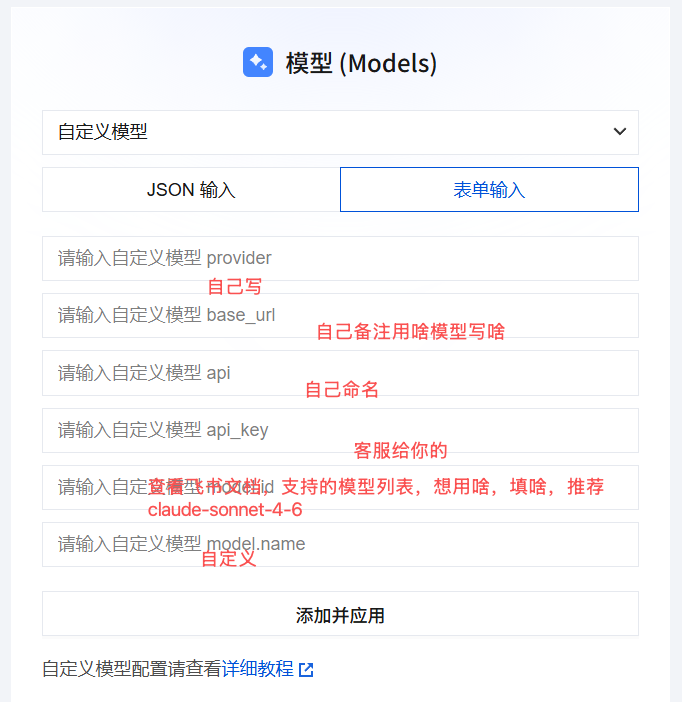 OpenClaw Custom Model Configuration screen; field positions are for refe…
OpenAI Compatible Configuration
Suitable for models compatible with Chat Completions, such as GPT, DeepSeek, Qwen, GLM, Kimi, and MiniMax:
{
  models: {
    mode: "merge",
    providers: {
      guishu: {
        baseUrl: "https://api.llm-token.cn/v1",
        apiKey: "YOUR_API_KEY",
        api: "openai-completions",
        models: [
          {
            id: "deepseek-v4-flash",
            name: "deepseek-v4-flash",
            input: ["text"]
          }
        ]
      }
    }
  }
}
Anthropic Messages Configuration
When the client explicitly requires the Anthropic Messages protocol, only change the api and the model ID:
{
  models: {
    mode: "merge",
    providers: {
      guishu: {
        baseUrl: "https://api.llm-token.cn/v1",
        apiKey: "YOUR_API_KEY",
        api: "anthropic-messages",
        models: [
          {
            id: "claude-sonnet-4-6",
            name: "claude-sonnet-4-6",
            input: ["text", "image"]
          }
        ]
      }
    }
  }
}
Checks Before Saving
- The OpenClaw field names are
baseUrlandapiKey, notbase_urlorapi_key. - In
api, enter the adapter name:openai-completionsoranthropic-messages, not the/messagespath. - Uniformly enter
https://api.llm-token.cn/v1for the Base URL, and stop appending/chat/completions. - The model ID is updated from time to time; copy it from the model list rather than copying old screenshots.
- After saving, run
openclaw models list, then switch using theopenclaw models set guishu/ model ID.
Do not share your real LLM API Gateway API Key in group chats, support-ticket screenshots, or public repositories. The YOUR_API_KEY in the example must be replaced with your own Key.