腾讯云 / OpenClaw 自訂模型設定
用可直接驗證的 JSON5 範例說明 OpenAI 與 Anthropic 相容介面的填寫方式。
先準備三項內容:貴數 API Key、https://api.llm-token.cn/v1、以及從本站模型清單複製的完整模型 ID。不要複製截圖中的舊位址或舊模型名稱。
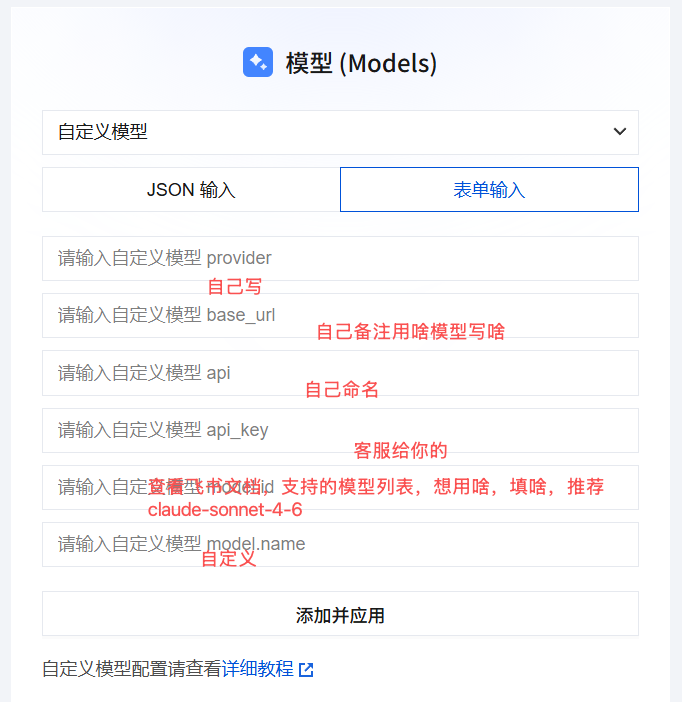 OpenClaw 自訂模型設定介面;欄位位置僅供參考,請使用本文給出的 HTTPS 位址和目前模型 ID
OpenAI Compatible 設定
適用於 GPT、DeepSeek、Qwen、GLM、Kimi、MiniMax 等相容 Chat Completions 的模型:
{
  models: {
    mode: "merge",
    providers: {
      guishu: {
        baseUrl: "https://api.llm-token.cn/v1",
        apiKey: "YOUR_API_KEY",
        api: "openai-completions",
        models: [
          {
            id: "deepseek-v4-flash",
            name: "deepseek-v4-flash",
            input: ["text"]
          }
        ]
      }
    }
  }
}
Anthropic Messages 設定
用戶端明確要求 Anthropic Messages 協定時,只需更換 api 和模型 ID:
{
  models: {
    mode: "merge",
    providers: {
      guishu: {
        baseUrl: "https://api.llm-token.cn/v1",
        apiKey: "YOUR_API_KEY",
        api: "anthropic-messages",
        models: [
          {
            id: "claude-sonnet-4-6",
            name: "claude-sonnet-4-6",
            input: ["text", "image"]
          }
        ]
      }
    }
  }
}
儲存前檢查
- OpenClaw 欄位名稱是
baseUrl、apiKey,不是base_url、api_key。 api填配接器名稱:openai-completions或anthropic-messages,不是/messages路徑。- Base URL 統一填寫
https://api.llm-token.cn/v1,不要再拼接/chat/completions。 - 模型 ID 會更新,請從模型清單複製,不要照抄舊截圖。
- 儲存後執行
openclaw models list,再用openclaw models set guishu/模型ID切換。
不要把真實 API Key 發到群聊、工單截圖或公開儲存庫。範例中的 YOUR_API_KEY 必須替換為你自己的 Key。