Tencent Cloud / OpenClaw Konfiguration eines benutzerdefinierten Modells
Ein direkt validierbares JSON5-Beispiel zur Erläuterung der Eingabe für die kompatiblen Schnittstellen von OpenAI und Anthropic.
Bereiten Sie zunächst drei Dinge vor: den LLM API Gateway API-Key, https://api.llm-token.cn/v1 sowie die vollständige Modell-ID, die Sie aus der Modellliste dieser Website kopieren. Übernehmen Sie nicht die alten Adressen oder alten Modellnamen aus den Screenshots.
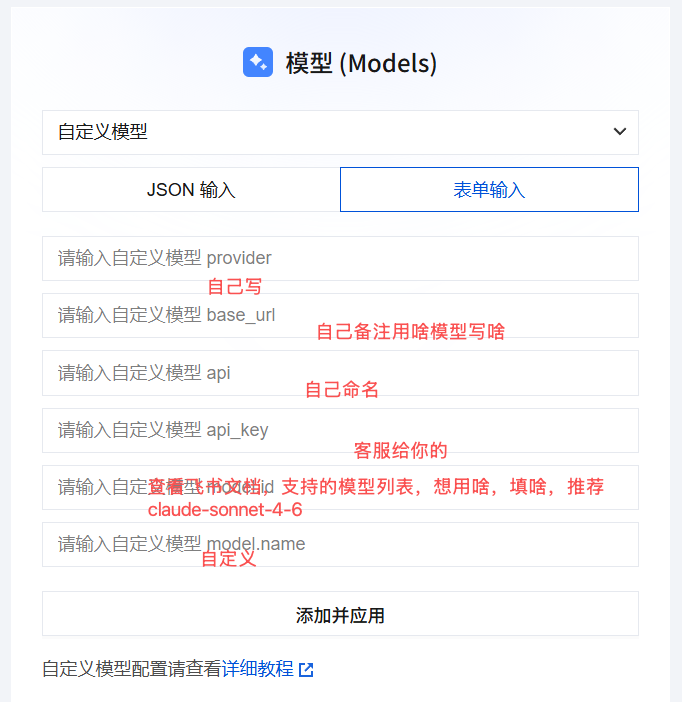 OpenClaw Benutzerdefinierte Modellkonfigurations-Oberfläche; die Feldpos…
OpenAI Compatible-Konfiguration
Geeignet für Modelle, die mit Chat Completions kompatibel sind, wie GPT, DeepSeek, Qwen, GLM, Kimi oder MiniMax:
{
  models: {
    mode: "merge",
    providers: {
      guishu: {
        baseUrl: "https://api.llm-token.cn/v1",
        apiKey: "YOUR_API_KEY",
        api: "openai-completions",
        models: [
          {
            id: "deepseek-v4-flash",
            name: "deepseek-v4-flash",
            input: ["text"]
          }
        ]
      }
    }
  }
}
Anthropic Messages-Konfiguration
Wenn der Client ausdrücklich das Anthropic-Messages-Protokoll verlangt, müssen nur api und die Modell-ID geändert werden:
{
  models: {
    mode: "merge",
    providers: {
      guishu: {
        baseUrl: "https://api.llm-token.cn/v1",
        apiKey: "YOUR_API_KEY",
        api: "anthropic-messages",
        models: [
          {
            id: "claude-sonnet-4-6",
            name: "claude-sonnet-4-6",
            input: ["text", "image"]
          }
        ]
      }
    }
  }
}
Prüfung vor dem Speichern
- Die OpenClaw-Feldnamen lauten
baseUrlundapiKey, nichtbase_urloderapi_key. apifüllen Sie mit dem Adapternamen aus:openai-completionsoderanthropic-messages, nicht mit dem/messages-Pfad.- Die Base URL einheitlich auf
https://api.llm-token.cn/v1setzen, nicht weiter/chat/completionsanhängen. - Die Modell-ID wird aktualisiert; kopieren Sie sie aus der Modellliste und übernehmen Sie sie nicht aus alten Screenshots.
- Führen Sie nach dem Speichern
openclaw models listaus und wechseln Sie anschließend mit demopenclaw models set guishu/-Modell fern IDumschalten.
Geben Sie keinen echten API-Key in Gruppenchats, Support-Tickets mit Screenshots oder öffentlichen Repositories weiter. Der YOUR_API_KEY im Beispiel muss durch Ihren eigenen Key ersetzt werden.