腾讯云 / OpenClaw 自定义模型配置
可直接校验的 JSON5 示例で、OpenAI と Anthropic の互換インターフェースの入力方法を説明します。
まず次の3点を用意します:LLM API Gateway の API Key、
https://api.llm-token.cn/v1、そして本サイトのモデル一覧からコピーした完全なモデル ID です。スクリーンショット内の古いアドレスや古いモデル名はコピーしないでください。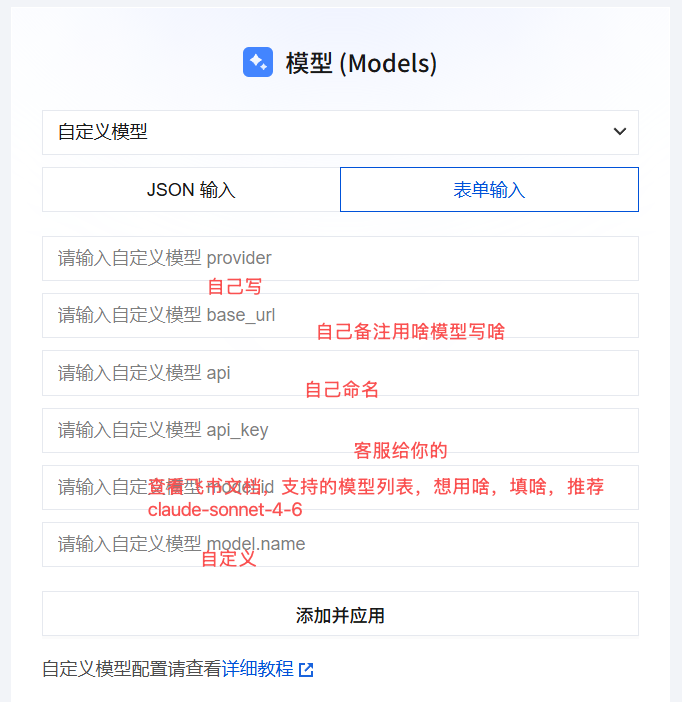 OpenClaw カスタムモデル設定画面
OpenAI Compatible 設定
GPT、DeepSeek、Qwen、GLM、Kimi、MiniMax など、Chat Completions 互換のモデル向け:
{
  models: {
    mode: "merge",
    providers: {
      guishu: {
        baseUrl: "https://api.llm-token.cn/v1",
        apiKey: "YOUR_API_KEY",
        api: "openai-completions",
        models: [
          {
            id: "deepseek-v4-flash",
            name: "deepseek-v4-flash",
            input: ["text"]
          }
        ]
      }
    }
  }
}
Anthropic Messages 設定
クライアントが Anthropic Messages プロトコルを明示的に要求する場合、api とモデル ID を変更するだけです:
{
  models: {
    mode: "merge",
    providers: {
      guishu: {
        baseUrl: "https://api.llm-token.cn/v1",
        apiKey: "YOUR_API_KEY",
        api: "anthropic-messages",
        models: [
          {
            id: "claude-sonnet-4-6",
            name: "claude-sonnet-4-6",
            input: ["text", "image"]
          }
        ]
      }
    }
  }
}
保存前の確認
- OpenClaw のフィールド名は
baseUrl、apiKeyであり、base_url、api_keyではありません。 apiにはアダプター名を入力します:openai-completionsまたはanthropic-messages。/messagesのパスではありません。- Base URL は統一して
https://api.llm-token.cn/v1を入力し、/chat/completionsを連結しないでください。 - モデル ID は更新されます。モデル一覧からコピーし、古いスクリーンショットをそのまま使わないでください。
- 保存後、
openclaw models listを実行し、openclaw models set guishu/モデルIDで切り替えてください。
実際の API Key をグループチャット、チケットのスクリーンショット、公開リポジトリに送らないでください。例の中の
YOUR_API_KEY は必ず自分の Key に置き換えてください。