OpenClaw Context Window and Rate-Limit Troubleshooting
Distinguish 429 rate limiting, context overflows, and local model-metadata errors; then safely adjust contextWindow, contextTokens, and maxTokens.
First, Identify the Error Type
API rate limit reached usually means the upstream returned 429, a concurrency limit, or a quota limit. You cannot judge from that message alone that it is a 16k context-configuration problem. First check the status code and the raw error, then decide whether to change the configuration.
| Symptom | More Likely Cause | What to Do First |
|---|---|---|
429, rate_limit, quota, too many requests | Upstream rate limit, concurrency limit, or insufficient quota | Reduce concurrency and retry later; check quota and upstream status |
context_length_exceeded, request too large, input exceeds limit | Input plus reserved output exceeds the model or gateway limit | Shorten the conversation, enable compression, then verify the context configuration |
| OpenClaw local prompt window too small | Missing custom-model metadata or a leftover old configuration | Check contextWindow, contextTokens, maxTokens |
| Only one model fails | Model routing or an issue with that model's parameters | Send a minimal request with a different model using the same Key and Base URL |
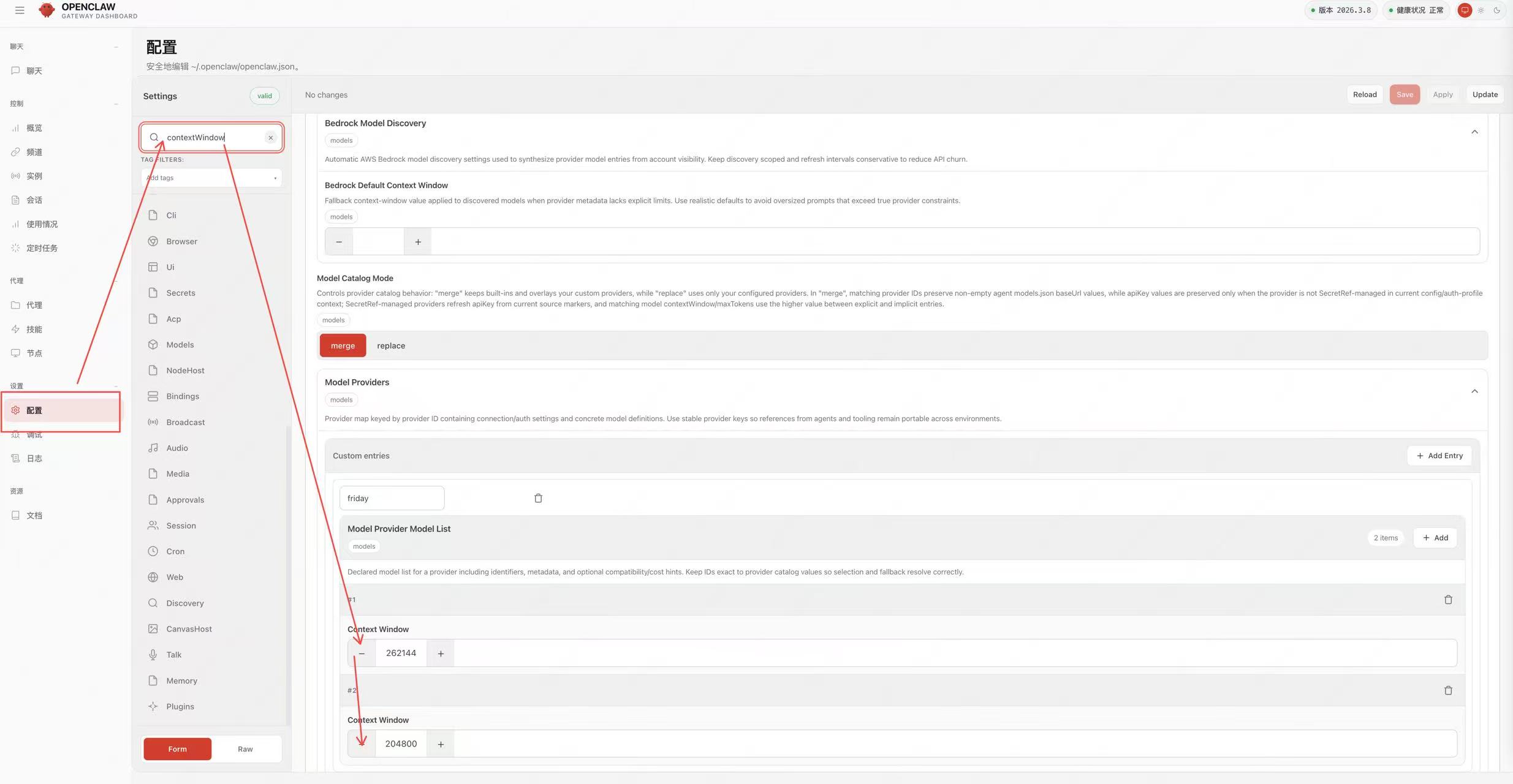 OpenClaw Location of the Model Window on the settings page. Exact field…
What the Three Fields Each Mean
contextWindow: metadata for the model's native context window.contextTokens: the limit the OpenClaw actually allows for input, which can be smaller than the native window.maxTokens: the maximum output-token limit for a single response, not the total context size.
Do not fill in 1M arbitrarily just to "get a larger context." Values must simultaneously match the model's capabilities, the LLM API Gateway's current routing limits, and the client version.
Configuration Locations
The main configuration is usually at:
~/.openclaw/openclaw.jsonWhen configured per agent, it is usually at:
~/.openclaw/agents/<agentId>/agent/models.jsonIf you have set OPENCLAW_AGENT_DIR, look in that directory for the corresponding agent configuration.
Safe Modification Example
The values below only demonstrate the relationship between the fields; they do not represent every model's real limits. First confirm the values in this site's model list and the current routing documentation:
{
  models: {
    mode: "merge",
    providers: {
      guishu: {
        baseUrl: "https://api.llm-token.cn/v1",
        apiKey: "YOUR_API_KEY",
        api: "openai-completions",
        models: [
          {
            id: "YOUR_MODEL_ID",
            name: "YOUR_MODEL_ID",
            contextWindow: 128000,
            contextTokens: 96000,
            maxTokens: 8192,
            input: ["text"]
          }
        ]
      }
    }
  }
}
Reserve part of the window for the system prompt, tool results, and model output. If the upstream only allows a smaller input or output, keep lowering the values; do not just fill in what the model vendor advertises.
Modification and Verification Order
- Back up the current configuration file; do not overwrite the only copy in place.
- Modify only the current provider and model entry; keep other configuration intact.
- Run
openclaw models listto confirm the model is recognized. - Run
openclaw models set guishu/YOUR_MODEL_IDto confirm the selected provider/model is correct. - Restart the gateway:
openclaw gateway restart. - First send a very short test request, then gradually increase the context.
If a short request also returns 429, enlarging the context window will not help; turn instead to checking concurrency, the account quota, and upstream status. If only long requests fail, then check the input length, the compression strategy, and the three context fields.
Configuration screenshots and logs may contain a API Key. Before handing them to support, redact the full Key and keep only the error time, status code, model ID, and request ID.