Qwen3.8-Omni-Flash Multimodal Model Launch: API and Audio-Video Agent Guide
Qwen3.8-Omni-Flash has officially launched as a fully multimodal model. It brings text, images, audio, and video into one Agent workflow. The goal is not only to understand content, but to move from inspecting source material and planning a task to calling tools and delivering a result. For developers working with long videos, meeting recordings, music videos, and film footage, the important part of this release is its audio-video agent direction—not another multimodal model that only chats.
This article is organized from the release material published by the Qwen large-model official WeChat account. The images retain the original release and demonstration graphics; the benchmark figures are vendor-published results, not independent tests by this site. Whether the model is already listed in this site's catalog, its current multiplier, and the actual charge are determined by live model pricing and real billing records.
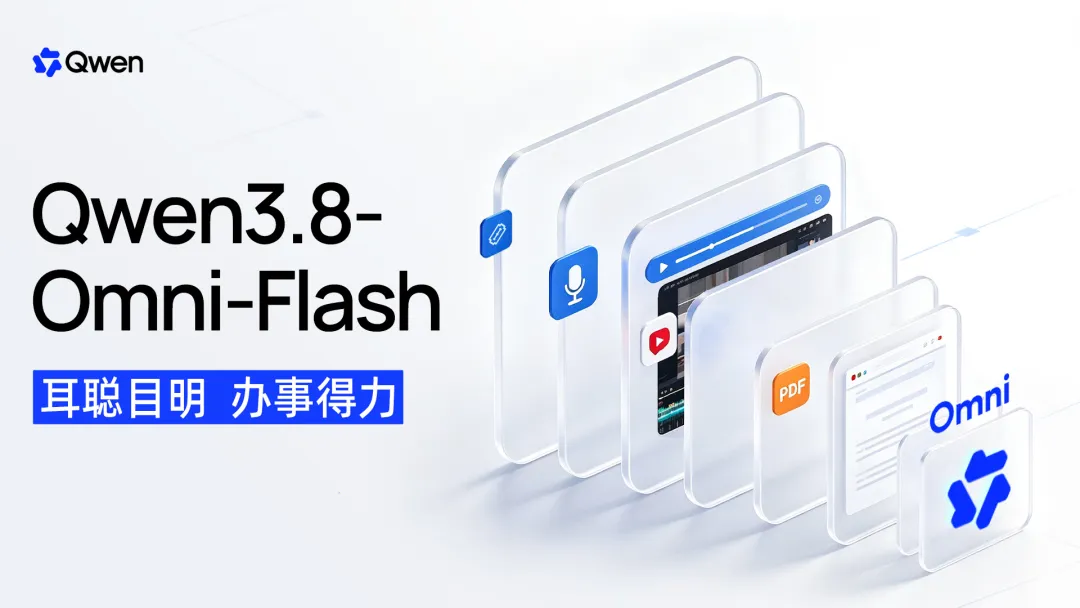
What inputs does Qwen3.8-Omni-Flash support?
| Item | Information in the release material |
|---|---|
| Model name | Qwen3.8-Omni-Flash |
| Input modalities | Text, image, audio, video |
| Context | Up to 1M tokens |
| Main directions | Audio-video agents, coding, text-based knowledge work, GUI operations |
| Long-horizon tasks | Long audio-video understanding, meeting notes and action items, video research reports, content creation |
| Companion tools | Qwen-MM-Plugins, Qwen-Live Harness |
The actual API model ID, protocol, context limits, and regional availability must be checked against the provider's current documentation. Do not assume that every OpenAI-compatible gateway supports audio, video, and tool return just because the release describes the model as “fully multimodal.” Validate text, image, audio, video, and tool calls separately during integration.
Official benchmarks: noticeable gains for audio-video agents and long-horizon tasks
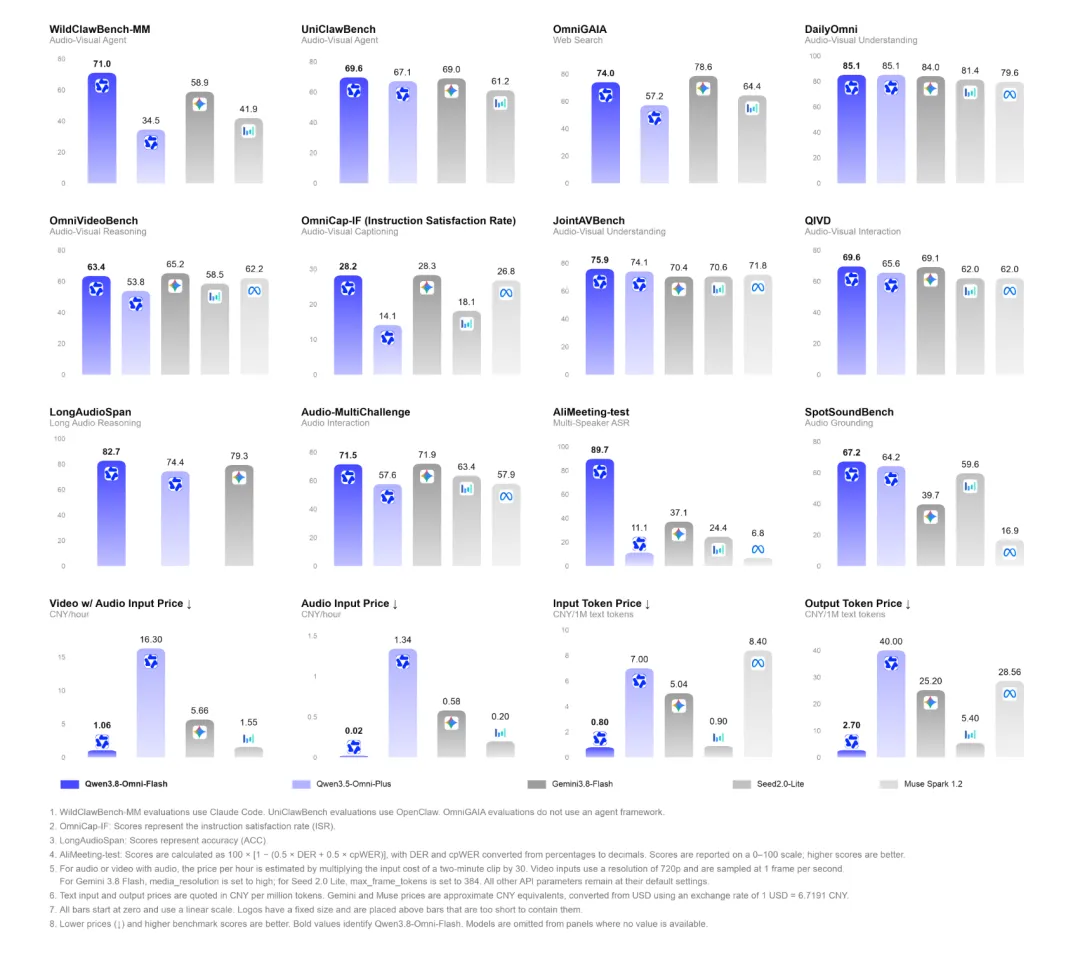
The release material says that Qwen3.8-Omni-Flash improved by more than 26% on average across 30 evaluations compared with the previous-generation Qwen3.5-Omni-Plus. Several easier-to-interpret changes include:
- WildClawBench-MM improved by 36.5 points, covering audio-video agents, coding, and long-horizon tasks;
- AgenticVBench improved by 22.3 points;
- UniClawBench scored 69.6;
- LongAudioSpan improved by 8.3 points and OmniVideoBench by 9.6 points;
- OmniCap-IF CSR / ISR improved by 8.5 / 14.1 points respectively;
- AliMeeting DER / cpWER fell from 88.11 / 89.61 to 3.35 / 17.18.
These figures should be interpreted together with the test set, prompts, tool environment, and evaluation metric. For example, DER and cpWER are meeting-recognition error metrics, where a lower value is generally better; an improved Agent benchmark score cannot be directly converted into the success rate of every production task.
A long context window is more than “being able to fit more video”
Qwen3.8-Omni-Flash supports sequences up to 1M tokens, but the value of a long context window is not simply the ability to upload larger files. A more practical change is that the model can decide what to inspect and listen to based on the question, then gather evidence from relevant clips through multiple coarse-to-fine passes.
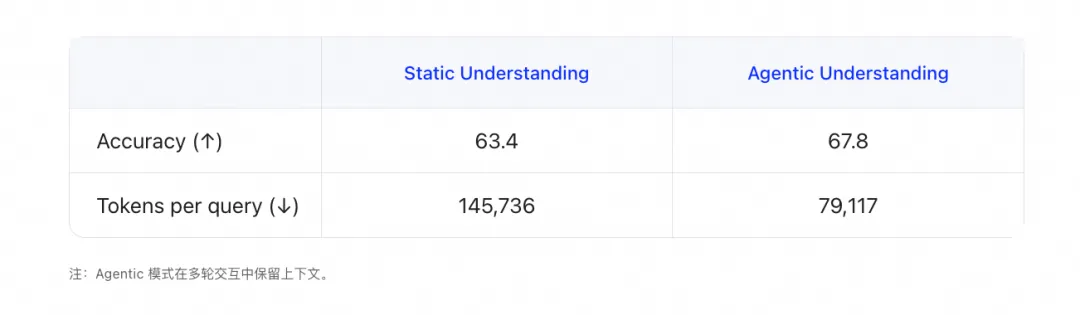
In the OmniVideoBench experiment cited by the official material, Agentic Understanding increased accuracy from 63.4 to 67.8, while token consumption fell from 145,736 to 79,117, a decrease of about 45.7%. This suggests that active evidence gathering may reduce repeated processing of irrelevant clips, but the actual cost still depends on file length, audio-video encoding, tool loops, output length, and the provider's billing rules.
Long meetings: from recording to execution
Group meetings combine visuals, audio, speaker segmentation, references, and project context. The release material says that Qwen3.8-Omni-Flash supports audio-video inputs of up to one hour, jointly understands people on screen and speech, performs speaker segmentation and transcription with identity matching, and then generates meeting notes, action items, and risk analysis.
With tools connected, the workflow can extend outward—for example, sending an email, organizing tasks, or starting code based on the meeting's requirements. Keep model suggestions separate from real external actions during acceptance testing: production environments should assign explicit tool permissions for sending mail, writing files, creating tasks, and running code.
Video-centered deep research
When a user asks a specific question about a video, a reliable answer often needs web pages, images, documents, and other videos in addition to the source footage. Qwen3.8-Omni-Flash can first extract the key questions from a video, then organize multimodal material into a research report with both text and images. For tutorials, courses, product demonstrations, and film footage, this is closer to a real workflow than generating a short summary alone.
Controllable video descriptions: one source, different outputs for different teams
Video description should not have only one fixed answer. Content creation cares about narrative, asset search cares about timestamps, and asset management cares about people, shots, sounds, and structured fields.
Qwen3.8-Omni-Flash is positioned to let the caller control the description target, time range, information granularity, and output format. The same footage could produce:
- A three-part plot synopsis for an editor;
- Timestamps, people, and key actions for search;
- JSON metadata for an asset library;
- A list of speakers, languages, and audio events for a captioning team.
This capability is better designed alongside structured outputs, file tools, and retrieval systems than used as a natural-language description viewed only in a chat window.
Audio-video production and editing: the model, tools, and runtime must evolve together
Long audio-video agents face more than a model-capability problem. They also need file storage, network transfer, multi-turn inference, timeline editing, and result delivery. The release material introduces two related open-source projects:
- Qwen-MM-Plugins: on-demand perception, tool calls, and workflow execution for long audio-video material;
- Qwen-Live Harness: a runtime environment for real-time, continuous fully multimodal interaction.
They can be understood as having different runtime emphases: one leans toward long-horizon tasks and material processing, while the other leans toward real-time interaction. Before deployment, check dependencies, GPU memory, file permissions, external network access, and plugin versions separately. Do not turn “the repository is open source” into a claim that it is “one-click production-ready locally.”
How do you integrate the Qwen3.8-Omni-Flash API?
If the provider has opened the corresponding route, start with a small, non-sensitive sample for a smoke test: one image, an audio clip lasting a few dozen seconds, and a short video. Test input, output, token usage, and error messages separately.
A typical OpenAI-compatible request shape looks like this. Replace model with the exact ID confirmed in the provider's live model catalog; do not guess the model name:
curl "$BASE_URL/chat/completions" \
  -H "Authorization: Bearer $API_KEY" \
  -H "Content-Type: application/json" \
  -d '{
    "model": "qwen3.8-omni-flash",
    "messages": [{
      "role": "user",
      "content": [
        {"type": "text", "text": "Summarize the subject, speakers, and three key timestamps in this material."},
        {"type": "input_video", "video_url": {"url": "https://example.com/demo.mp4"}}
      ]
    }],
    "stream": false
  }'
The input_video field above only illustrates why multimodal requests require independent validation of content-block formats. It does not mean that every compatible interface accepts this field. Before a real integration, consult the provider documentation and record:
- Whether the interface supports video URLs, Base64, or file IDs;
- Per-file size, duration, format, and download-timeout limits;
- How audio/video tokens are calculated and priced;
- Whether tool calls, structured output, and streaming responses are supported;
- Whether a failed retry can create a duplicate charge.
If you call through this site's gateway, first open live model pricing, confirm the model ID, multiplier, and current capabilities, and then use a small balance to verify the real bill. This site's articles do not treat an official launch price or another platform's price as this site's own quote.
What use cases fit?
1. Video editing and asset search
Have the model locate shots, people, actions, and audio events first, then pass them to editing tools for rough cuts, captions, and chapter organization. Acceptance should compare timestamp accuracy and miss rates, not just whether the summary reads smoothly.
2. Music videos and film commentary
The model can understand visuals, dialogue, music, and narrative structure together, then generate a script, shot notes, or a commentary draft. The final production still requires human review for rights, factual accuracy, and language quality.
3. Meetings and knowledge work
Meeting videos can enter a pipeline for transcription, speaker identification, notes, risk analysis, and task creation. When customers, employees, or trade secrets are involved, confirm the data-storage and external-transfer boundaries first.
4. Multimodal deep research
Use a video as the research entry point, then combine web pages, images, documents, and other videos to fill in context. This fits course reviews, product research, and technical tutorial analysis.
Selection and integration checklist
- Confirm that the provider really exposes
Qwen3.8-Omni-Flash; do not rely on a news headline alone. - Test text, images, audio, and video separately with small, non-sensitive files.
- Record file size, duration, input/output tokens, latency, caching, and actual charges.
- Create independent acceptance samples for OCR, speaker identification, timestamps, video Q&A, and tool execution.
- Put video understanding, file reading, task creation, email sending, and code execution behind separate permission boundaries.
- Set budgets, timeouts, retry rules, and human-takeover conditions for long tasks.
- Log the model version, request date, provider, protocol, and response structure for traceability.
Frequently asked questions
Is Qwen3.8-Omni-Flash an ordinary vision model?
No. Its release positioning is as a native fully multimodal model with text, image, audio, and video input, combining audio-video understanding with Agent tool execution.
How long a video does it support?
The release material mentions audio-video inputs of up to one hour and a 1M-token context window. The concrete limit may still depend on the API, file size, encoding, region, and provider implementation, so use the current interface documentation and real requests as the source of truth.
Does a 1M-token context window guarantee lower costs?
No. A long context expands the processing range, but file uploads, audio-video tokens, tool loops, and output all add cost. Agentic evidence gathering may reduce irrelevant processing, but it must be validated with real usage.
What is the difference between Qwen-Live Harness and Qwen-MM-Plugins?
The former is a runtime environment for real-time, continuous fully multimodal interaction; the latter focuses on on-demand perception, tool calls, and workflow execution for long audio-video material. Both are companion projects, not the same API model.
Does this site already support Qwen3.8-Omni-Flash?
This article does not replace the live catalog. Check the model pricing page for the model ID, multiplier, modality support, and actual billing before using it in production.
Conclusion
The key point of the Qwen3.8-Omni-Flash multimodal model launch is that audio and video become working material that an Agent can continuously inspect, plan around, call tools on, and turn into a deliverable. Validate it with a small set of real tasks first: test long-video Q&A, meeting notes, and asset search, then add editing, research, and task execution step by step.
Source: the user-provided offline WeChat page titled “全模态模型Qwen3.8-Omni-Flash发布.” The images come from the original article and have been copied into this site's static assets directory; page scripts and third-party instructions were not treated as article content.