Tencent Marvis File Manager Use Cases: Recovering "Disappearing" Files, Image OCR, and AI Gallery Search That Makes a Computer Feel Like It Can See

If the previous Marvis articles focused on:
- system-level assistance
- local knowledge bases
- multimodal productivity
this one tries to answer a far more ordinary question, and probably a more annoying one:
When you only remember what a file said, what a photo showed, or a few words inside a screenshot, but cannot remember the filename or folder path, can Marvis actually bring it back?
I went back through the public materials on the Marvis website, Tencent Cloud Developer Community, and the case studies around file management, local document recognition, and image-content search. My view is straightforward:
What makes the Marvis file-management direction interesting is not that it adds another search box. It is that it starts to combine semantic file search, image OCR, AI gallery search, authorized local folders, and bulk organization into something much closer to a real desktop file workspace.
Start with the conclusion
-
As of June 29, 2026, the most notable public
Marviscapabilities in the "file manager / image search" direction already cover at least four things:- Recovering files by time, content, and visual traits
- Searching image content and text inside images
- Organizing an AI gallery by people, themes, holidays, and locations
- Running local document recognition and bulk organization inside authorized folders
-
The value here is not just "it can search." It is that it supports a style of retrieval that matches how people actually remember things:
- I remember editing it last week
- I remember it mentioned "invoice"
- I remember it was that beach photo from last summer
- I remember the cover slide was blue
-
If your day regularly involves:
- finding screenshots
- finding invoices
- locating
Word / PDF / Excelfiles - digging up old reference materials
- or cleaning up a downloads folder and desktop
then this
Marvis"file manager" direction is much more relevant than a generic chat AI.
Why file search is a better test than flashy demos
Many AI products like to demonstrate big tasks:
- writing a plan
- summarizing a document
- generating a page
But in real computer use, the tasks that repeat the most and wear people down are often the smallest ones:
- a file was definitely saved, but cannot be found
- you know a screenshot contains a certain word, but cannot remember which folder it lives in
- you want to search a
PDFby content, not by filename - you want to regroup a messy pile of materials without dragging everything by hand
These tasks all share the same profile:
- they are not hard
- they are extremely fragmented
- and they happen constantly
That is why I think they are a better test of whether Marvis is really becoming a system-level assistant.
The challenge here is not an abstract prompt. It is:
the pile of real files on your computer that you touch every day and still fail to find half the time.
The official positioning is already clear: file content, image content, and text inside images are all searchable
The public Marvis positioning is unusually direct on this point. The official materials explicitly describe capabilities such as:
- intelligent file organization and search
- searching file content and image content
- searching text inside images
- organizing an AI gallery and AI document library by people, themes, holidays, and locations
Put together, that is no longer just "file search." It is really three layers stacked together:
- searching beyond filenames
- reading image content and image text
- reorganizing images and documents in a way that matches human memory
In other words, what Marvis seems to be building here is not a traditional desktop search tool. It is closer to:
a computer that can understand what its files and images actually contain
Use case 1: Recovering a "disappearing" file is really a semantic search problem
The most directly usable public case study is this Tencent Cloud Developer Community article:
Marvis Tutorial (2): File Manager - Recover "Disappearing" Files with One Sentence
This is also a useful WeChat-syndicated case. The Tencent Cloud post mirrors an article originally published on the WeChat public account 数字师匠训练营.
What makes it valuable is that it breaks file retrieval into several very real kinds of search.
1.1 Search by time
For example:
- "Help me find the math test paper that was sent to me last week."
Traditional search struggles here because you may not remember:
- the filename
- the folder path
- the file extension
But the public Marvis workflow described in the article is built around understanding the time clue first, then narrowing the scope.
1.2 Search by content
For example:
- "Help me find the lesson plan that mentions the Pythagorean theorem."
The public case explicitly says it can read:
WordPPTExcelPDFTXT
That means it is not only searching filenames. It is searching:
inside the body of the file
1.3 Search by traits
This is the part that feels the closest to how people actually remember things.
The public examples include:
- "Help me find that
PPTwith the blue cover, around20pages long." - "Help me find the photo I took at the beach last summer."
- "Help me find all screenshots that contain the word 'invoice'."
This shows the center of gravity has shifted away from "did you name your files well?" and toward:
if I remember even one fuzzy trait, I can still get the file back
Use case 2: A department lead finds two hours of materials in five minutes
The same WeChat-syndicated article includes a scenario that feels much closer to a real work environment than a lab demo:
A department lead needs to submit a summary report the next day and has to gather:
- lesson plans for this semester's public Chinese-language classes
- review notes
- score analysis sheets
Those materials are scattered across:
- the WeChat downloads folder
- email attachments
- a school shared drive
- local folders on the computer
The public comparison is blunt:
- traditional method: at least 2 hours
- with
Marvis: 5 minutes
More importantly, the story is not only about finding a single file. The article says the workflow continues with:
- collecting the materials into one folder
- renaming them by topic
That is where it starts to move from "search" into "organization."
Use case 3: It does not just find files, it can batch-organize them and confirm before deletion
That same public case study also mentions two very practical commands:
- "Move all
PDFfiles from my desktop into the teaching materials folder on driveD." - "Delete all documents on drive
Dwhose filenames contain 'draft'."
The most important detail here is not that it can move or delete files. It is how deletion is handled:
it lists the files first and asks for confirmation
That is exactly what a system-level product should do.
Once local file actions are involved, users usually care less about speed than about:
- whether something might be deleted by mistake
- whether they can inspect the list first
- whether there is a safety confirmation step
That small design detail says a lot. It suggests Marvis is not treating file management as a toy search demo. It is touching real desktop actions.
Use case 4: Local document recognition brings in folder authorization, scan scope, and privacy mode
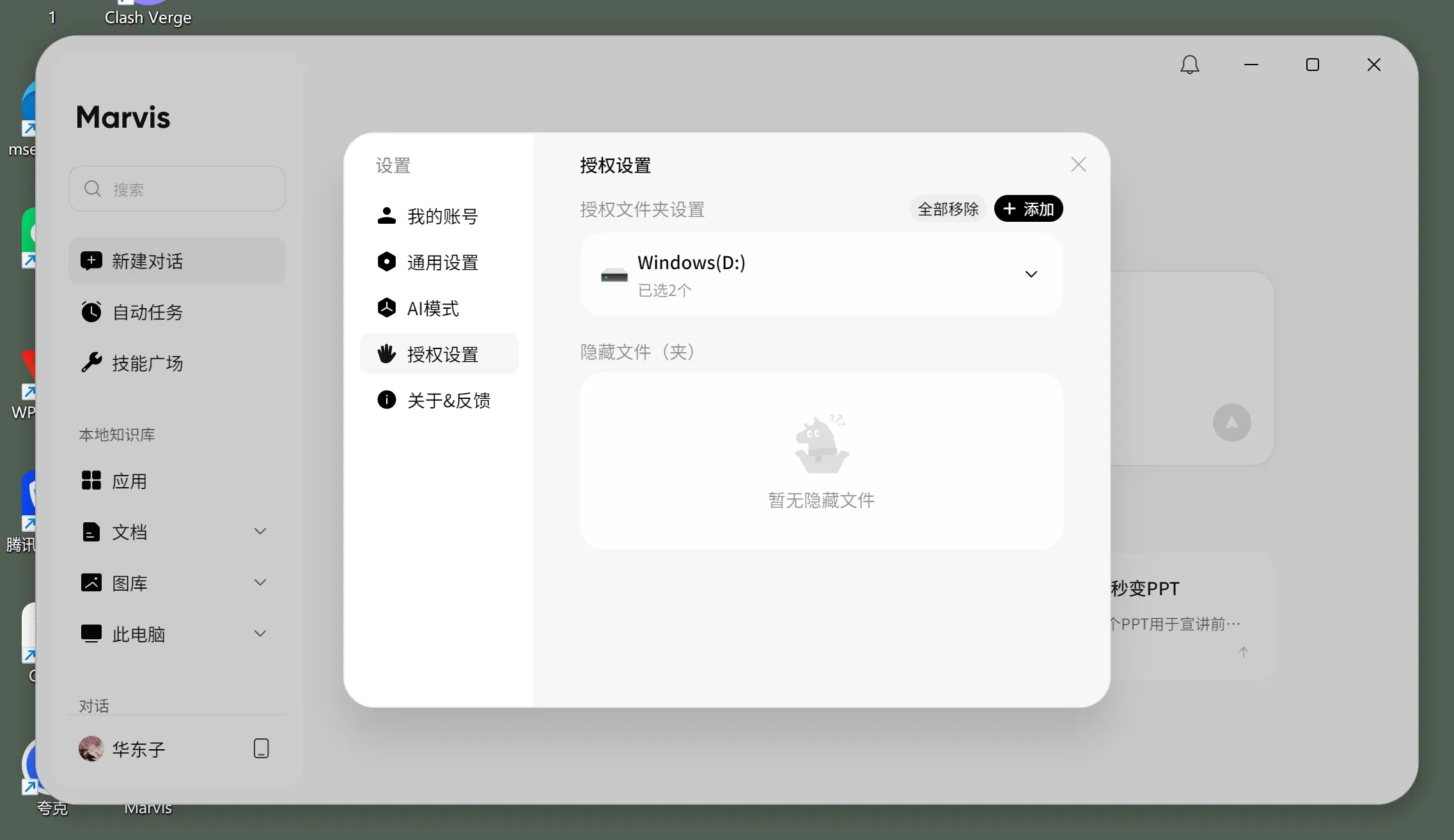
If the WeChat-syndicated tutorial is more usage-oriented, another public article is more useful for understanding the underlying workflow:
Save Time in Practice: Using Marvis Local Document Recognition to Stop Digging Through Folders for Knowledge Search
That article explains the file-search workflow in more detail. The key points include:
- support for content search in
PDF,Word, and similar formats - better indexing efficiency through precisely authorized folders
- a setup flow that requires only two steps:
- grant file permissions
- define the scan scope
- the option to choose local mode for data security
That means the Marvis file-management direction is not just an agent that can search. It already has a fairly clear production boundary:
- authorize first
- index next
- search after that
- then decide whether to keep processing local
That boundary matters. Without it, a lot of genuinely sensitive materials would never be trusted to a system-level assistant:
- contracts
- financial files
- internal plans
- invoice screenshots
- client materials
AI gallery search is where it starts to separate itself from ordinary file search
The most interesting part of this direction is probably not PDF retrieval. It is the official claim that Marvis can:
- search image content
- search text inside images
- organize images and documents by people, themes, holidays, and locations
- provide an AI gallery
Why does that matter?
Because for many people, the hardest thing to manage on a computer is not documents. It is images and screenshots:
- invoice screenshots
- shipping label captures
- product images
- travel photos
- long screenshots saved from group chats
- random visual assets from unknown sources
Traditional file systems mostly force you to rely on:
- filenames
- dates
- folder structure
But that is not how people actually remember images.
You are much more likely to remember:
- it had the word "invoice" in it
- it was taken at the beach
- it was a screenshot of a report with a red cover
- it contained a person
That is exactly the problem the official AI gallery narrative is pointed at.
Why this is not the same thing as a local knowledge base
You could argue that this sounds a lot like the Marvis local knowledge base direction.
It does overlap, but the emphasis is different.
The local knowledge base path is more about:
- document Q&A
- material archiving
- long-term knowledge accumulation
This "file manager / image OCR / AI gallery" direction is more about:
- I need to find it right now
- I need to search the screenshot right now
- I need to clean up this desktop right now
So it feels more like:
an immediate desktop retrieval and organization layer
rather than:
a long-term knowledge layer
Who should try it first
Good candidates to try it now
- people with too many images, screenshots, and reference files on their computer
- people who constantly need to find invoices, courseware,
PDFfiles, or old materials - anyone whose WeChat downloads folder, desktop, and shared-drive folders are permanently messy
- users who want to search images by content or search screenshots by text
- people who want to get the file workflow under control before adding more complex agent scenarios
People who can wait and watch
- people who barely use local files and images
- teams whose work mostly stays inside cloud collaboration tools
- users who do not want to authorize local folders
- people who only want a general chat AI, not a file workspace
If you want to connect a Marvis-like file and image workflow to custom models, where is the buying value?
From the business side, the real questions are usually not "can it find the file?" They are:
- are token costs stable for file and image tasks
- should
OCR, long-document Q&A, and screenshot understanding use different models - can local-material workflows share one unified gateway and billing layer
- can file tasks across multiple agents run through one entry point
So if you are building for file search / image OCR / screenshot understanding / local material organization, a unified model gateway is usually more practical than betting everything on one model.
You can continue from these entry points:
My final judgment
If I had to summarize my view of the Marvis "file manager / image OCR / AI gallery" direction in one sentence, it would be this:
What matters most is not that it can search files. It is that it is starting to turn "find a file by content, find an image by image content, find a screenshot by the text inside it, then organize the results in bulk" into one desktop workflow people could actually keep using.
In other words, what feels most real is not how magical one retrieval looks in a demo. It is that Marvis is getting closer to a more natural way of using a computer:
- you do not need to remember the filename
- you only need to remember the content, trait, or context
- the system helps you find it and then helps you organize it
If this direction keeps getting deeper, Marvis will not just be "a computer that can search." It will increasingly feel like:
a computer that can actually understand your files and images
References
- Marvis Official Website
- Marvis Tutorial (2): File Manager - Recover "Disappearing" Files with One Sentence
- Save Time in Practice: Using Marvis Local Document Recognition to Stop Digging Through Folders for Knowledge Search
- Beginner's Complete Guide: Using Tencent Marvis for Personal Knowledge Management and Intelligent Q&A