Tencent Marvis 파일 관리자 사례: 사라진 파일 찾기, 이미지 OCR, AI 갤러리 검색

이 Marvis 글이 다루는 질문은 매우 일상적입니다. filename이나 folder는 기억나지 않지만 파일 내용, 사진 속 장면, screenshot 안의 글자는 기억날 때 Marvis가 그것을 찾아줄 수 있느냐입니다.
공개 자료를 보면 Marvis file manager 방향의 흥미로운 점은 검색창을 하나 더 만드는 것이 아닙니다. semantic file search, image OCR, AI gallery, authorized local folders, bulk organization을 결합해 PC 안의 file workspace에 가까워지는 것입니다.
Start with the conclusion
- 2026년 6월 29일 기준 Marvis의 file manager / image search 공개 기능은 네 가지로 정리됩니다.
- time, content, visual traits로 file 찾기
- image content와 text inside images 검색
- people, theme, holiday, location으로 AI gallery 정리
- authorized folders 안에서 local document recognition과 bulk organization 수행
- 가치는 "검색된다"가 아니라 사람이 실제로 기억하는 방식에 가까운 검색이 가능하다는 점입니다.
Why file search is a better test than flashy demos
실제 PC 작업에서는 화려한 demo보다 "저장한 파일을 못 찾겠다", "screenshot 안의 글자로 찾고 싶다", "PDF를 filename이 아니라 내용으로 찾고 싶다" 같은 작은 문제가 반복됩니다. 이 문제를 풀 수 있는지가 system-level assistant의 실용성을 잘 보여줍니다.
The official positioning is already clear: file content, image content, and text inside images are all searchable
Marvis 공식 포지셔닝에서는 file content, image content, image 안의 text가 검색 대상입니다. 이는 일반 filename search보다 한 단계 깊은 retrieval입니다.
Use case 1: Recovering a "disappearing" file is really a semantic search problem
1.1 Search by time
"지난주에 편집했다", "어제 저장했다" 같은 시간 기억으로 찾는 기능은 실제 file recovery에서 매우 중요합니다.
1.2 Search by content
"invoice라는 단어가 들어 있었다", "어떤 client명이 있었다"처럼 내용 기억으로 찾을 수 있으면 filename을 잊어도 복구할 수 있습니다.
1.3 Search by traits
"blue cover PPT", "beach photo" 같은 visual traits로 찾을 수 있으면 image OCR과 gallery search의 가치가 커집니다.
Use case 2: A department lead finds two hours of materials in five minutes
공개 사례의 가치는 검색 demo가 아니라 시간 절감입니다. 사람이 여러 folder를 열어 찾는 작업을 content search와 summary로 줄일 수 있습니다.
Use case 3: It does not just find files, it can batch-organize them and confirm before deletion
file 정리에서 중요한 것은 자동 삭제가 아니라 후보를 모으고, 분류하고, 삭제나 이동 전에 확인하는 것입니다. 이 부분은 안전성과 바로 연결됩니다.
Use case 4: Local document recognition brings in folder authorization, scan scope, and privacy mode
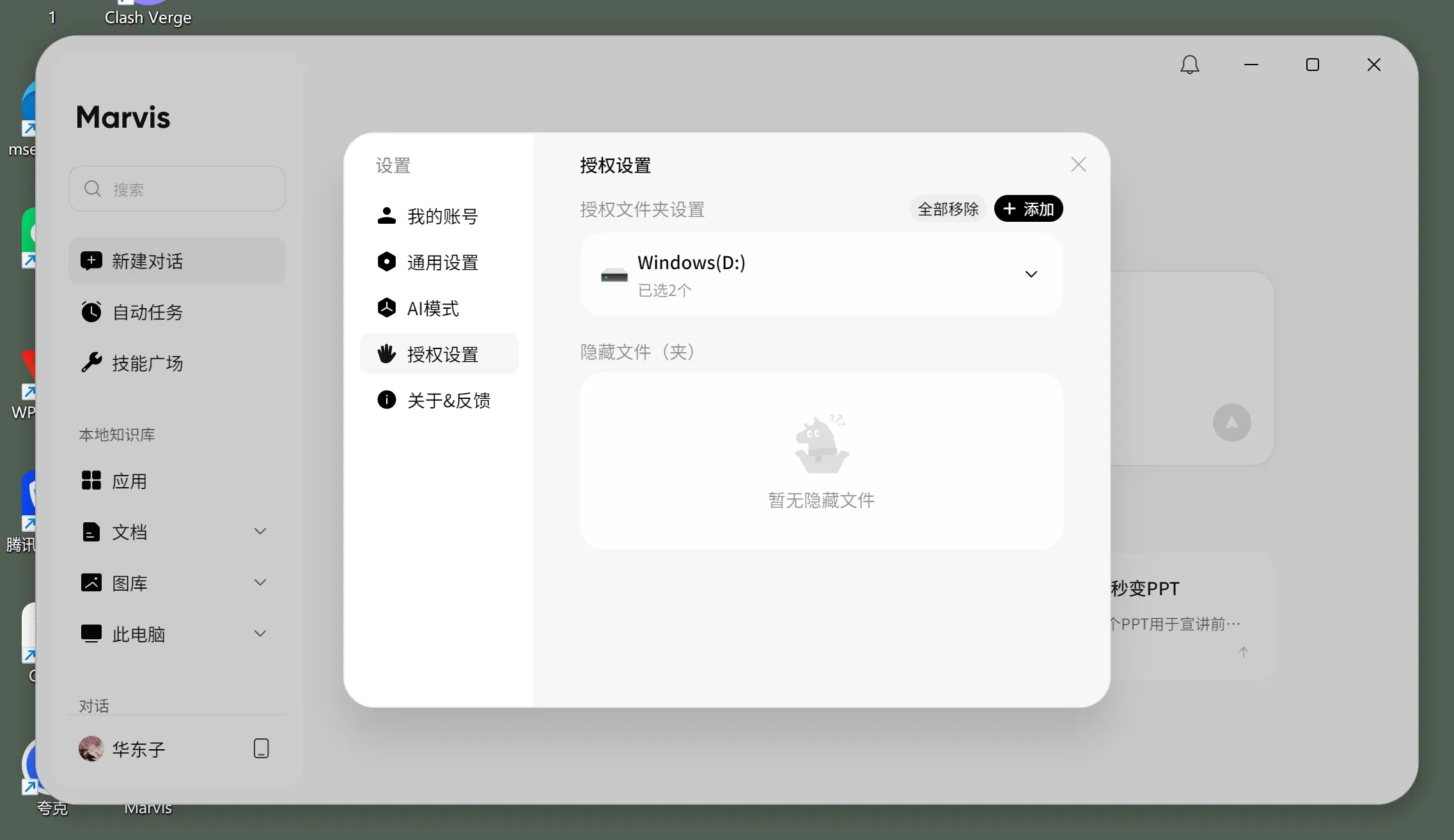
local document recognition에서는 어떤 folder를 허용할지, scan scope를 어떻게 제한할지, sensitive files를 local mode로 처리할지가 중요합니다.
AI gallery search is where it starts to separate itself from ordinary file search
AI gallery에서는 사람, 장소, holiday, theme로 사진을 찾는 방향이 보입니다. 이는 document search가 아니라 PC가 이미지 내용을 이해하는 방향입니다.
Why this is not the same thing as a local knowledge base
local knowledge base는 주로 document Q&A에 가깝습니다. file manager는 찾기, 정리, 이동, 중복 처리처럼 PC 위의 file operation에 더 가깝습니다.
Who should try it first
Good candidates to try it now
- screenshots, invoice, PDF, Word, Excel을 자주 찾는 사람
- downloads folder나 desktop이 자주 어지러워지는 team
- image나 document 내용으로 검색하고 싶은 knowledge worker
People who can wait and watch
- file 수가 적고 folder naming이 이미 잘 정리된 사람
- sensitive file policy가 없어 scan permission을 정하기 어려운 조직
If you want to connect a Marvis-like file and image workflow to custom models, where is the buying value?
구매 가치는 싼 token만이 아니라 image OCR, document understanding, semantic retrieval을 workflow 단위로 결합할 수 있느냐에 있습니다.
My final judgment
Marvis file manager 방향은 화려하지 않지만 실용적입니다. file name이 아니라 사람이 기억하는 내용, 시간, 모양으로 찾을 수 있다면 desktop AI로서 가치는 매우 분명해집니다.
References
- Marvis Official Website
- Marvis Tutorial (2): File Manager - Recover "Disappearing" Files with One Sentence
- Save Time in Practice: Using Marvis Local Document Recognition to Stop Digging Through Folders for Knowledge Search
- Beginner's Complete Guide: Using Tencent Marvis for Personal Knowledge Management and Intelligent Q&A