Tencent WorkBuddy Map Use Cases: Why Tourism, Site Selection, and Group Travel Planning Make LBS Feel Like a Real Agent
What makes WorkBuddy interesting on the maps and LBS track is not whether AI can answer "what's nearby." It is that the product is already stitching together several high-frequency tasks into one continuous workflow:
- Recommending fair meetup points for multiple people
- Planning hotels, restaurants, and attractions together
- Comparing routes and travel times with real map data
- Producing site selection analysis and visual reports
I went back through several public Tencent Location Service case studies, Tencent Cloud Developer Community posts, and public discussion about WorkBuddy on X. My conclusion is pretty direct:
Maps and LBS deserve their own deep dive not because WorkBuddy "also connects to maps," but because this is one of the clearest examples of the kind of work Agents should be good at: natural language input -> tool calls -> live data retrieval -> structured output.
The Short Version
- As of June 29, 2026, the most convincing public
WorkBuddyuse cases in maps andLBSfall into three buckets:- Group meetup and route planning
- Tourism concierge and local discovery
- Commercial site selection and visual reporting
- What matters most here is not map rendering by itself, but the stack behind it:
MCPtool invocation- Tencent Maps
JSAPI GL - Layered
LBS/WebService/Skillcapabilities - Structured outputs instead of one-off chat replies
- Public discussion on X also tends to frame
WorkBuddyless as a chatbot and more as a system that can:- Run multiple Agents in parallel
- Use native tools directly
- Deliver actual outcomes
Why Maps and LBS Fit Agents Better Than a Plain Chat Box
Map workflows look like simple information lookup on the surface, but in practice they behave like multi-step tasks:
- First understand the user's intent
- Then break it into several tool calls
- Sort, filter, and compare the returned results
- Only then give a recommendation or report someone can actually use
This is where a generic chat AI usually struggles:
- No access to real geospatial data
- No trustworthy route timing
- No multi-point comparison
- No stable structured output
WorkBuddy has an edge in these scenarios precisely because it does more than answer in text. It can run against Tencent Maps capabilities such as:
POIsearch- Nearby search
- Route planning
- Map rendering
- Skill orchestration
- Local
JSONor page output
So this is not just "another plugin connected to AI."
It is one of the best ways to test whether WorkBuddy is actually functioning like a real Agent workspace.
Case 1: Group Meetups Turn Maps From Navigation Into a Planning System
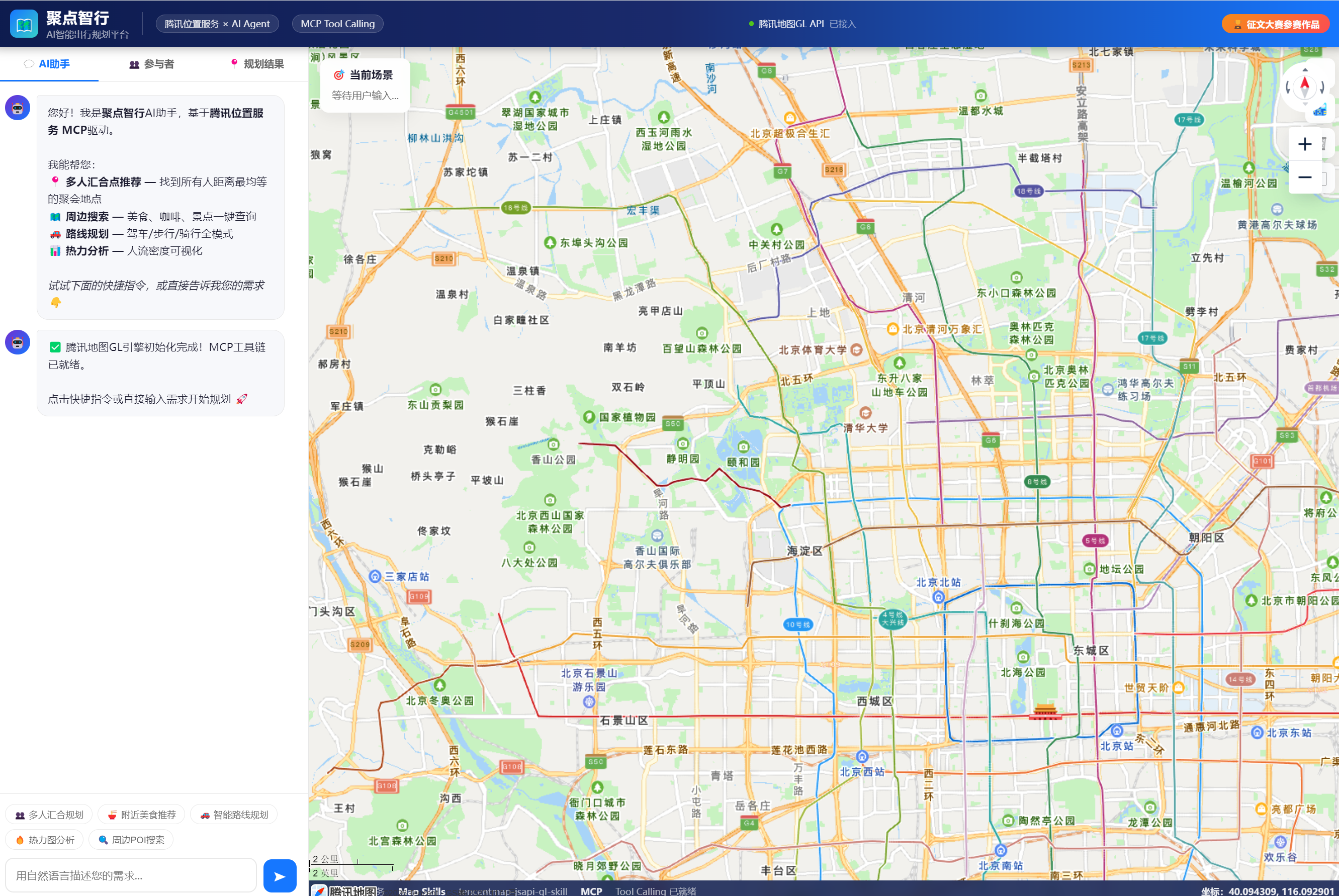
One of the most revealing public examples is this Tencent Location Service contest entry:
Judiandian Zhixing: Building an AI Map Application with WorkBuddy
What makes it valuable is that it is not about finding a single store. It turns maps into a harder coordination problem:
If several people start from different places, where should they meet so the trip feels fair and efficient for everyone?
The public write-up describes the product very clearly:
- An
AI-driven planning platform for multi-person meetups and travel - Natural language interaction
- An algorithm for optimal meetup points
- Visualized
MCP Tool Calling - Tencent Maps
GL 3Dpresentation
Put together, this is already a complete task chain:
- The user describes the need in natural language
WorkBuddyanalyzes the task- It calls an
MCPtool chain - It pulls location and route data from Tencent Maps
- The map layer renders the result
- The system outputs an interactive planning result
The public case also gives a concrete performance claim:
- Development efficiency improved by 20x to 30x
And it highlights an important technical detail:
- Tencent Maps
GLinstead of the standard version - More than 14 map tools
- Advanced visualization such as multi-point markers, route connections, and heat maps
That tells us the value of WorkBuddy in mapping is not just generating a few APIs.
It is already helping developers pull "map capability + Agent orchestration + frontend visualization" into one working environment.
Case 2: A Tourism Concierge Without Writing a Single Line of Code
Another public case that is especially useful for long-tail SEO is:
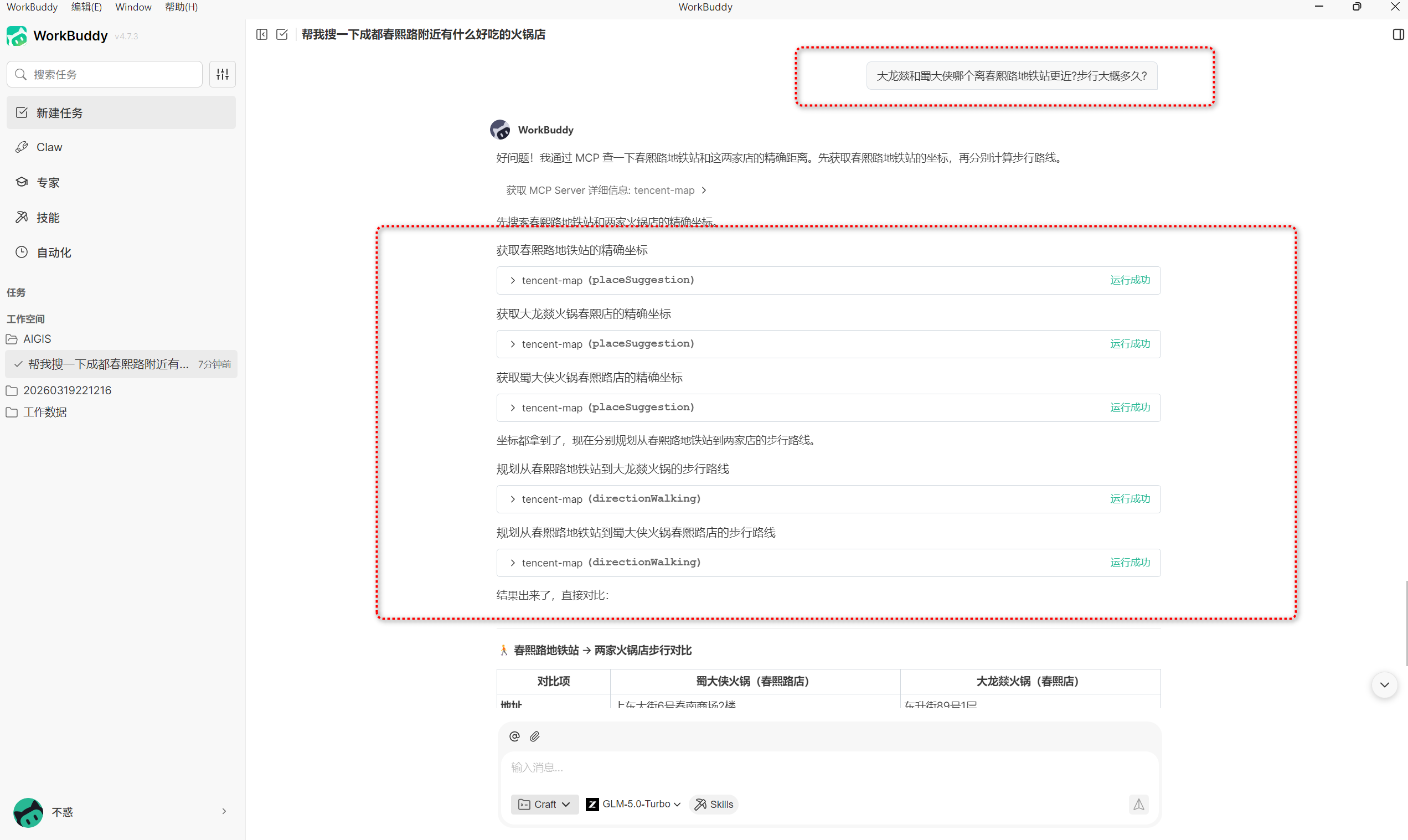
Without Writing One Line of Code, I Built a Tourism Concierge with WorkBuddy + Tencent Maps Skills + MCP
What I like about this example is how fully it covers a very common, very grounded scenario:
- Finding good food
- Recommending hotels
- Calculating walking time
- Checking real travel distance
- Turning those pieces into a coherent family trip or short itinerary
And the post makes one point very explicit:
No coding required.
Why does that matter? Because it shows the value here is not limited to developer tooling. It is already getting close to something business users can test on their own.
The example workflow is straightforward:
- A user describes a family holiday need for the May Day break
WorkBuddyuses mapSkillsandMCPto call Tencent Location Services- It automatically compares nearby food, hotels, and routes with real data
- The user can continue asking follow-up questions like which option is closer to a subway station and how long the walk takes
This feels close to a production scenario because it does not stop at generating a static page. It is a workflow you can keep asking, recalculating, and refining.
In other words, this is no longer just "tourism content generation." It is closer to:
A travel decision assistant grounded in real map data.
If you are building:
- A local discovery assistant
- Family trip planning tools
- City guides
- Travel itinerary orchestration
- Hotel, dining, or attraction recommendations
then this case is more useful than generic "AI tourism" examples, because it proves at least one thing:
WorkBuddy in map-based scenarios is not just generating copy. It can work with real distances and real routes.
Case 3: AI Site Selection Starts Moving From Demo to Repeatable Product
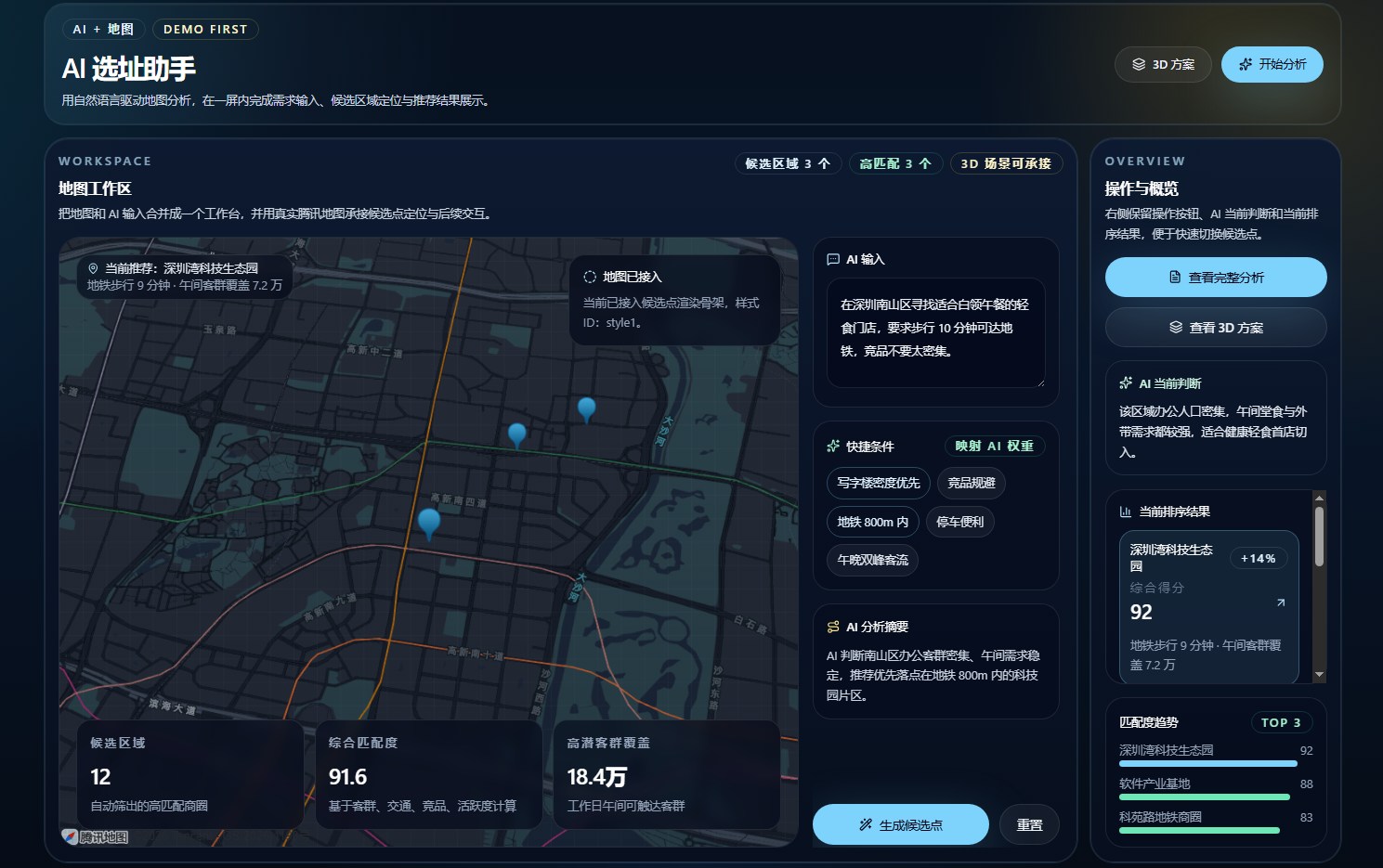
The third piece I most recommend calling out on its own is the second-prize Tencent Location Service contest entry:
Let AI Help You Choose the Right Location: WorkBuddy + Tencent Location Service Turn Site Selection Reports Into an Interactive Assistant
This case matters because it spells out one of the biggest traps map Agents fall into:
- Every generated page has a different structure
- Data is hard to reuse
- The output may look impressive, but it is unstable for business delivery
So the author pulls the solution back to a more durable pattern:
- The user provides the requirement
WorkBuddyorchestrates the site selection workflow- Tencent Maps
Skillsprovide the data layer - The system generates a standardized
JSON - The frontend renders it into an analysis report automatically
Why is this important? Because it is no longer "AI improvises a page on the fly." It is much closer to a deliverable product shape.
The public write-up also breaks down the Skill responsibilities clearly:
TencentMap_jsapi_skills- Map initialization
- 3D view
- Overlay drawing
- Layer management
TencentMap_lbs_skills- Nearby search
- Tourism planning
- Track visualization
TencentMap_webservice_skills- Address conversion
POIsearch- Route planning
- Distance matrix
- Foundational services such as weather and administrative divisions
That shows WorkBuddy in site selection is not positioned as just a map library.
It is acting more like a site selection analysis orchestrator.
The article also adds another important business perspective:
- Different industries weight site selection factors differently
- Site selection is not just a map display problem, but a business analysis problem
That is what moves it from "nice demo" toward something that could actually be useful commercially.
What These Three Cases Tell Us About Real-World Map and LBS Workflows
Put the public examples together and a stable production pattern starts to emerge around WorkBuddy on the maps and LBS track:
- Natural language input
- A map
Skill/MCPtool chain - Real location data, real routes, and real
POIinformation - A traceable tool-calling process
- Structured result output
- A frontend visualization layer that receives and presents the result
That is the biggest difference from many "AI map demos":
It is not just embedding a map. It is turning map capability into orchestratable task capability.
Why This Feels Closer to the Core of an Agent Than Many "AI Office" Demos
Map tasks are hard to fake.
If you claim a route takes a certain amount of time, or a place is nearby, or one location is a better fit, those claims have to survive contact with the real world:
- Is the distance correct?
- Is the time estimate correct?
- Is the
POIdata correct? - Does the ranking logic make sense?
- Can the output be queried again and reused?
That pressure naturally pushes WorkBuddy toward a harder, more credible path:
- Call tools
- Pull real data
- Preserve structure
- Make the process visible
And that is exactly why maps and LBS are better than many lightweight content scenarios for answering the real question:
Is WorkBuddy a chat product, or is it an Agent actually doing work?
Which Teams Should Try This First
Good Candidates to Test Now
- Teams building products for local services, tourism, travel, or site selection
- Teams already evaluating map
API,MCP, andSkillorchestration paths - Teams that need to combine natural language workflows with real geospatial data
- Developers or product teams that want an interactive, traceable map Agent demo
Teams That Can Wait
- Teams that only need ordinary text Q&A
- Teams with no real need for map data or route planning
- Teams that do not plan to handle tool calling, frontend rendering, or structured output
- Businesses that do not involve location, stores, routes, travel, or regional analysis
Where the Procurement Value Shows Up If You Want a Custom Model Behind a WorkBuddy-Style Map Agent
In maps and LBS scenarios, the more practical question is usually not whether the model writes smoothly. It is things like:
- How long the tool-calling chain becomes
- Whether token cost stays stable across follow-up turns
- Whether different
SkillorMCPcapabilities need different models - Whether the business side can get one billing surface and one entry point
So if you are building a map Agent, travel assistant, site selection workflow, or tourism planning tool, a unified model gateway is often more useful than optimizing around a single model alone.
You can continue from these pages:
My Final Take
If I had to summarize my view of the WorkBuddy maps and LBS cases in one sentence, it would be this:
What matters most is not that AI has been connected to a map, but that map data, tool invocation, structured output, and frontend delivery are already being pulled into one continuous task chain inside WorkBuddy.
That is why the product feels most real not when it says "what's nearby," but when it starts handling three tougher categories of work:
- Multi-origin travel and route decisions
- Tourism itineraries and local discovery planning
- Site selection analysis and interactive report delivery
If those three tracks keep deepening, then WorkBuddy's role in mapping will not look like "an office AI with a map plugin."
It will look more like:
A genuine Agent workspace that can call into real-world location capabilities.
References
- Tencent launches an efficiency-focused agent toolkit to build an AI productivity entry point for diverse users
- Judiandian Zhixing: Building an AI Map Application with WorkBuddy
- Without Writing One Line of Code, I Built a Tourism Concierge with WorkBuddy + Tencent Maps Skills + MCP
- Let AI Help You Choose the Right Location: WorkBuddy + Tencent Location Service Turn Site Selection Reports Into an Interactive Assistant
- Build an intelligent travel planning assistant with WorkBuddy + tencentmap skill
- X: Introducing Tencent WorkBuddy — an AI-native agent designed for productivity
- X: Tencent AI launched a native integration between WorkBuddy and Tencent Docs