Tencent WorkBuddy for A-Share Research: 40+ Stock Comparison, HTML-to-DOCX Export, and a More Realistic AI Research Workflow
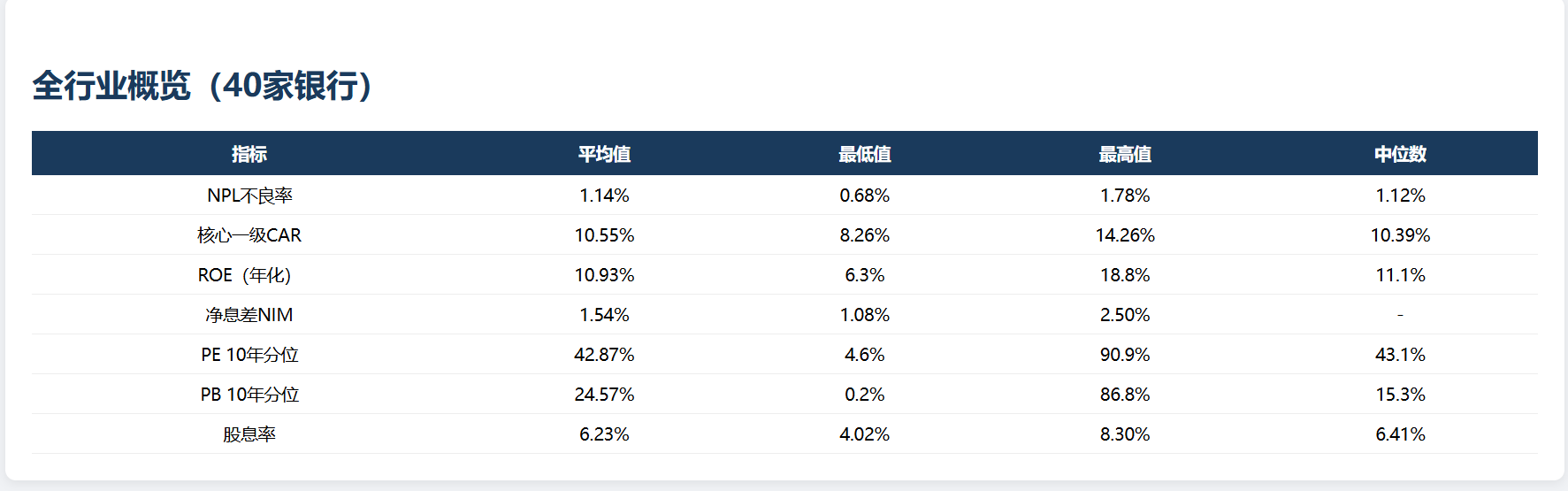
If you look at WorkBuddy and only see "an AI that can draft a research note," you are probably looking at the least interesting layer.
I went back through Tencent Cloud Developer Community's public article on building an A-share research automation pipeline with WorkBuddy, and the strongest signal is not that it can write a conclusion. It is that the case ties several research steps into one chain:
- data collection
- broad comparison across names
- long-form report generation
HTMLtoDOCXconversion- knowledge-base upload and reuse
That is a much more useful buyer signal than another generic "AI can help analysts" claim.
One boundary matters up front:
This does not mean every research team is already using the same WorkBuddy front-end or the exact same operating model.
What the public case does show is narrower and more credible:
Tencent's public workflow material places WorkBuddy-style AI and agent capabilities inside a task flow that looks much closer to a real research-production environment than a simple chat demo.
Start with the verdict
-
As of June 29, 2026, the most convincing public
WorkBuddysignal for A-share research is not a single report-writing step. It is a four-part workflow:- Data collection and initial research
HTMLdeep-dive report generationHTMLtoDOCXconversion- Knowledge-base upload
-
The public case looks more production-shaped because it includes details such as:
- 3 months of real usage experience
- 40+ stocks compared side by side
- a 4-step knowledge-base upload flow
- cross-session memory management
- practical issues like Chinese-character encoding in
DOCX, expired tokens, and disconnected connectors
-
If your team does work like:
- A-share or China market research
- buy-side or sell-side research support
- sector tracking
- templated report production
- research knowledge-base building
then this case is more useful than a generic "AI writes investment reports" landing page.
Why research teams respond fastest to workflow AI, not just better answers
The most time-consuming part of research is usually not writing one sharp sentence.
It is work like this:
- collect source data
- read filings and prior reports
- compare companies side by side
- draft a report in a fixed structure
- archive the result so the next round of work does not restart from zero
In other words, the painful part is usually not the opinion itself. It is this:
too many fragmented research steps, too many formats, and too little natural accumulation into reusable team knowledge.
That is why the better question is not "is the model eloquent enough?"
It is:
- can the workflow be broken into repeatable steps
- can the format conversion hold up
- can research memory and a team knowledge base keep growing over time
Scenario 1: In research, the key is not only analysis quality. It is whether analysis connects to delivery
The public case does one thing right immediately: it does not stop at "can AI produce a view?"
Instead, it breaks the task into four stages:
- Data collection and initial research
- Generate an
HTMLdeep-research report - Convert
HTMLtoDOCX - Upload to the knowledge base
That feels realistic.
Many research teams are not blocked because nobody can form an opinion. They are blocked because:
- findings are scattered across separate sessions
- process knowledge is hard to reuse
- finished work does not easily become part of a shared research asset
At a high level, this public workflow is trying to solve exactly that.
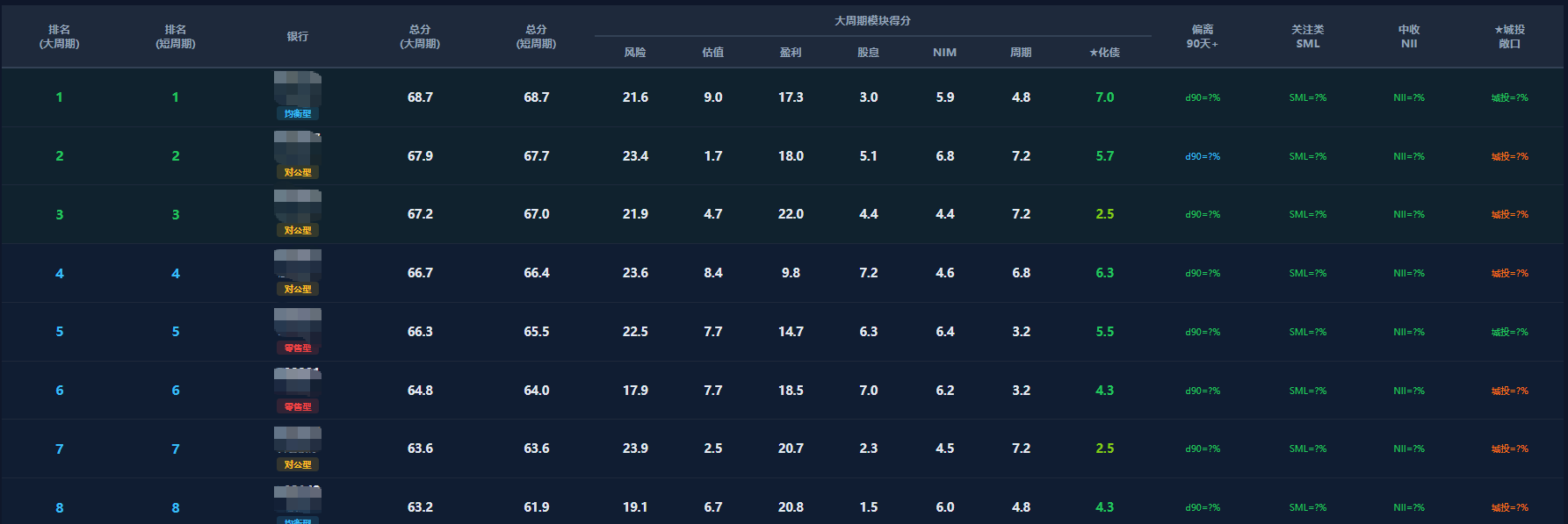
Scenario 2: Comparing 40+ stocks signals batch research, not one-off writing
One of the most useful details in the public case is this:
- 40+ stocks compared horizontally
Why does that matter?
Because it suggests the workflow is not just about drafting one company note. It is dealing with:
- broad peer comparison
- structured sector research
- template-driven output
That matters a lot in A-share work. In many real teams, the exhausting part is not writing the final deep dive. It is:
- screening a wide field first
- then narrowing down which names deserve deeper work
So the value signal here is not necessarily "does it sound like a star analyst?"
It is:
can it absorb the repetitive, format-heavy groundwork that comes before the highest-value judgment call?
Scenario 3: HTML to DOCX looks small, but it may be the most production-like part
This may be the most underrated detail in the whole case:
HTMLtoDOCXconversion
It sounds minor, but it is where many "AI research workflows" quietly break.
Plenty of teams can get to:
- one conclusion inside a chat window
- one markdown draft in a side panel
But formal circulation still often depends on Word or DOCX.
If the last mile still requires manual reformatting, the workflow is not really closed.
That is why the public case mentioning these issues makes it more believable, not less:
HTMLtoDOCX- Chinese text encoding problems
- expired tokens
- disconnected connectors
Those are exactly the kinds of issues that show up when a workflow has been pushed closer to actual delivery.
In that sense, WorkBuddy here is doing more than content generation.
It is touching:
the last mile where research output has to become a deliverable document.
Scenario 4: The 4-step knowledge-base upload flow matters because the goal is not one report, but reusable research assets
The second signal I would pay close attention to is:
- a 4-step knowledge-base upload flow
That suggests the workflow is not designed to stop after one report. It is trying to:
- push research findings into a knowledge base
- let future work reuse prior discoveries
- connect cross-session memory to a more durable asset layer
Why is that important?
Because many research teams do not mainly need one more report. They need this:
a way to avoid redoing the same groundwork every time coverage resumes.
If output never gets absorbed into a knowledge base, AI stays close to a disposable writing tool. If output can flow back into a reusable internal corpus, it starts looking more like:
a research workbench that compounds team knowledge over time.
Scenario 5: Cross-session memory is what makes follow-up research plausible
The public case also highlights:
- cross-session memory management
That is a valuable detail because A-share research is rarely a one-and-done task.
Real cadence looks more like:
- review the sector today
- add filings tomorrow
- refresh valuation next week
- fold in fresh announcements, policy changes, or earnings guidance later
If the system starts from zero each time, a lot of its practical value disappears.
That is why cross-session memory matters. At its best, it helps the workflow maintain some continuity around:
the same watchlist, the same sector thread, and the same unfinished research path.
Scenario 6: Why this looks more like WorkBuddy than a normal chat model
From the public case, the strongest reason this feels more like WorkBuddy than a generic model chat box is not raw model strength. It is workflow shape:
- it can take in files and research material
- it can output across formats
- it can push results into a knowledge base
- it can maintain research context across more than one session
That is a very different goal from ordinary chat AI.
A normal model experience is usually:
- ask one question
- get one answer
This case points toward something else:
- start a research chain
- let the system connect research, drafting, conversion, and knowledge capture
That is why the better mental model here is:
a research workstation
not:
a chat window that can talk about stocks.
Which teams should pay attention first
Best fit to evaluate now
- teams doing A-share tracking, sector coverage, and formal research output
- analysts or research associates who do heavy peer comparison and templated reporting
- teams trying to turn research output into a reusable knowledge base
- teams that regularly need to convert research into formal deliverables
Teams that can wait
- teams doing only lightweight one-off Q&A
- teams with no fixed report structure and no knowledge-retention requirement
- teams that do not need cross-session continuity
If you want to build a similar workflow, what to check first
If your real interest is not "which upstream product name should I remember?" but how to assemble a similar workflow for your own research stack, start with:
The practical lens is more important than the brand label:
- model capability
- research workflow design
- format conversion
- knowledge capture
That is the combination worth evaluating first.
Final take
If I had to reduce this WorkBuddy A-share research case to one line, it would be this:
The important signal is not that AI can write a research report. It is that AI is starting to enter the actual research pipeline: research, generation, format conversion, and knowledge-base capture.
If that chain works reliably, the outcome is bigger than time saved on one deliverable. It points to a shift from one-off output toward:
a team research system that gets more reusable over time.